Set Up Your Own Subnet
This is an advanced guide for creating a private, isolated network. This is useful for enterprise applications or private testing environments that require a controlled group of validators.
A subnet works exactly like connecting to the testnet or mainnet. The only difference is that you supply your own swarm key and your own bootstrap nodes instead of the official Rubix ones. A subnet runs in localnet mode, so the node looks for a localnetswarm.key file in its root folder. Only nodes that share the same swarm key can discover and connect to each other, which is what isolates your subnet from the public network.
1. Create a custom Swarm Key
-
Install the
ipfs-swarm-key-genkey generation tool:go install github.com/Kubuxu/go-ipfs-swarm-key-gen/ipfs-swarm-key-gen@latest -
Generate your unique swarm key as
localnetswarm.key:ipfs-swarm-key-gen > localnetswarm.key
2. Distribute the Key
Every node that should be part of your subnet needs a copy of the same localnetswarm.key file in its root folder (the directory you run rubixgoplatform from). A node with a different key, or no key, cannot join the subnet.
3. Configure each node
In each node's config.toml:
- Set
network_modeto"localnet". - List your subnet's bootstrap nodes under
localnet_bootstrap_nodesso the nodes can find each other. Use the multiaddress of one or more of your already-running subnet nodes.
[core]
node_index = 0
network_mode = "localnet"

[ipfs]
localnet_bootstrap_nodes = [
    "/ip4/<your-node-ip>/tcp/4002/p2p/<your-node-peer-id>",
]
4. Run your subnet nodes
Start each node pointing at its config directory:
./rubixgoplatform run -p <node_name>
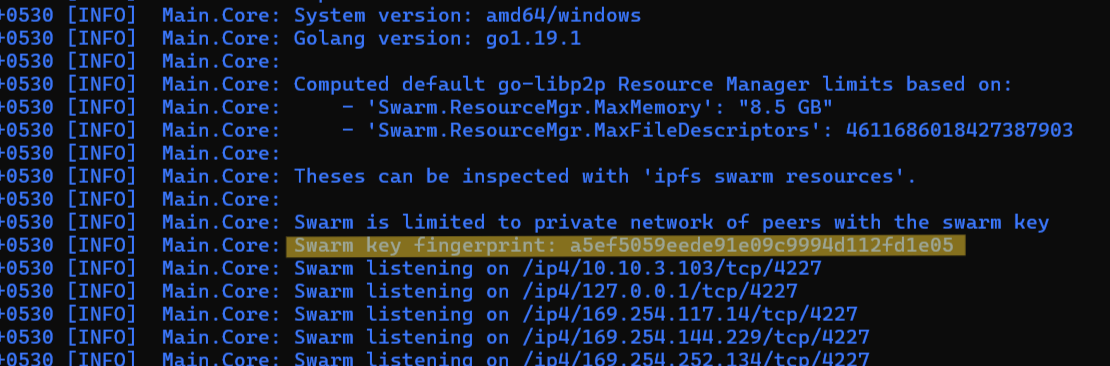
Check your node logs to verify the swarm key fingerprint and confirm that all of your nodes are connected to each other within the private subnet.
Mint Localnet RBT
A subnet runs in localnet mode, so you can mint RBT tokens locally for testing instead of using a faucet. You first need a DID on the node.
./rubixgoplatform generatelocalrbt -did <did> -numTokens 1 -port <port_number>
Example:
./rubixgoplatform generatelocalrbt -did bafybmibieftxw5tesd7s5d4l7wiustue44u6r2qepmb22krbx6sanhbc2a -numTokens 1 -port 20001
Verify the balance:
./rubixgoplatform getrbtbalance -did <did> -port 20001